Please enter your email address and password to log in to your account. If you don't have an account yet, you can easily sign up and join us today.
I forgot my password
Log in
Don't have an account? Sign up now
Sign up
Please fill in the details below to create your account. Make sure to enter your name, email, password, and confirm your password.
Sign up
Already have an account? Log in now
Hello
Welcome!
-℃Inside Temp
-%Humidity
Analysis
Charts
Plans
Supports
Shop
Ads
Account
Content
Notifs
Edit Profile
Change Password
My Ads
Manage Devices
Notifications
Logout
Change password
In this section, you can change your account password.
Change
Profile
Please complete your profile to help us improve your experience. Don't worry, your information will remain private and won't be visible to other users.
Save Profile
Contents
What Is the Ideal Temperature for a House in Every Season?
What Is the Ideal Temperature for a House in Every Season?
What Is the Ideal Temperature for a House in Every Season?
Back to Contents
Tempfort Support
1. What does the Tempfort device actually do?
+
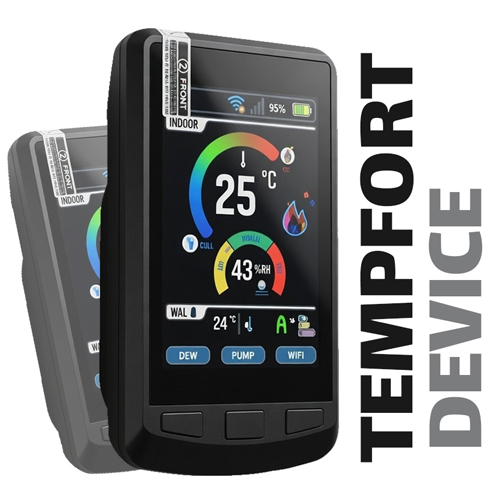
The Tempfort device captures real-time environmental temperature and sends the data to the mobile app. This helps you manage your environment more efficiently — because every single degree matters.
2. Does installing the device require technical knowledge?
+
No, the installation is very simple and requires no technical skills. Just power on the device and connect it through the app.
3. Does the device need an internet connection?
+
Yes, the device uses the internet to send data to the app. A stable connection ensures your temperature data is always updated.
4. What features does the Tempfort app offer?
+
The Tempfort app provides real-time temperature and humidity tracking, historical data visualization, smart alerts, and energy optimization suggestions.
5. Is my information secure?
+
Yes, protecting user data is a top priority at Tempfort. Your information is encrypted and securely stored.
6. What types of spaces is the device suitable for?
+
The Tempfort device is ideal for homes, offices, shops, and any environment where temperature control matters.
7. Can I manage multiple devices with one app?
+
Yes, you can add and manage multiple devices through a single app, each tracked individually
Notifications
Stay updated with the latest notifications and announcements. This section provides quick summaries to keep you informed.
Feb 05, 2025, 20:25
The new version of the Tempfort app is now available! In this update, you can not only access all the previous features but also take advantage of the "Plans" section to design your home's floor plan
Devices
Connect your devices to your account by entering the device code. Manage and sync your devices easily in this section.
Add new device
Add device
The Latest
Inside and outside temp Changes
Ideal temperature
Set
Draw your House plan
Wall Properties
Save
Delete This wall
Analysis
Ensure that the device is mounted at least two meters away from any heating or cooling systems in all directions.
Start analysis
We are analyzing
03:00
Stop Analysing
Restart Analysing
Analysis history
History of all your previous analyses
Order registration
To order a device, you can complete the form below now, and our sales experts will contact you.
Place Order
The Latest Ads
If you would like to publish your advertisements on Tempfort, please click here.
Allservicesproducts
Back To Ads
Password Recovery
To recover your password, first enter your email address to receive a verification code. Then, by entering the code, you can set a new password for your account.
Send Verification Code
Check verification code
Set new password
Back to login
Post an Advertisement
To publish your ad on Tempfort, please enter your advertisement details in this section
If the price is not fixed, leave this field empty.
Publish ad
My Ads
In this section, you can manage your advertisements.